


Specifications
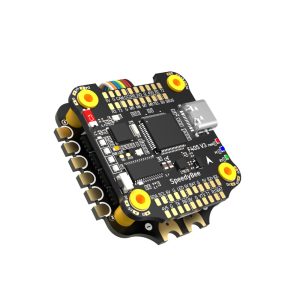
FC Product Name: SpeedyBee F7 V3 Flight Controller
MCU: STM32F722
IMU(Gyro): BMI270
USB Port Type: Type-C
Barometer: BMP280
OSD Chip: AT7456E chip
BLE Bluetooth: Supported. Used for Flight Controller configuration,built-in a single 2.4 GHz Wi-Fi-and-Bluetooth
combo chip
Flash FC Firmware Wirelessly: Supported. Please enter MENU > FC Firmware Flasher
Download/Analyze Blackbox: Supported.Please enter MENU > Blackbox Analyzer
DJI Air Unit Connection Way: Two ways supported: 6-pin connector or direct soldering.
6-pin DJI Air Unit Plug: Supported. Completely compatible with DJI O3/RunCam Link/Caddx Vista/DJI Air Unit V1, no wire is needed to be changed.
Flash(for BlackBox): 500MB
BetaFlight Camera Control Pad: Yes(CC pad on the front side)
Power Input: 3S – 6S Lipo
5V Output: 10 groups of 5V output, three +5V pads and 1 BZ+ pad( used for Buzzer) on front side, and 6 +5V output included in the connectors on bottom side. The total current load is 2A.
9V Output: 2 groups of 9V output, one +9V pad on front side and other included in a connector on bottom side. The total current load is 4A.
3.3V Output: Supported. Designed for 3.3V-input receivers. Up to 500mA current load.
4.5V Output: Supported. Designed for receiver and GPS module even when the FC is powered through the USB port. Up to 500mA current load.
ESC Signal Pads: M1 – M4 on bottom side and M5-M8 on front side.
UART: 5 sets(UART1, UART2, UART3, UART4(For ESC Telemetry), UART6)
ESC Telemetry UART: R4(UART4)
I2C: Supported. SDA & SCL pads on front side. Used for magnetometer, sonar, etc.
LED Pad: Used for WS2812 LED controlled by Betaflight firmware.
Buzzer: BZ+ and BZ- pad used for 5V Buzzer
BOOT Button: Supported.
[A]. Press and hold BOOT button and power the FC on at the same time will force the FC to enter DFU mode, this is for firmware flashing when the FC gets bricked.
[B]. When the FC is powered on and in standby mode, the BOOT button can be used to controller the LED strips connected to LED1-LED4 connectors on the bottom side. By default, short-press the BOOT button to cycle the LED displaying mode. Long-press the BOOT button to switch between SpeedyBee-LED mode and BF-LED mode. Under BF-LED mode, all the LED1-LED4 strips will be controlled by Betaflight firmware.
RSSI Input: Supported. Named as RS on the front side.
SmartPort: Supported
Supported Flight Controller Firmware: BetaFlight(Default)
Firmware Target Name: SPEEDYBEEF7V3
Mounting: 30.5 x 30.5mm( 4mm hole diameter)
Dimension: 41(L) x 38(W) x 8.1(H)mm
Weight: 10.7g
ESC Product Name: SpeedyBee BL32 50A 4-in-1 ESC
Firmware: J-H-50
Configurator Download Link: http://github.com/bitdump/BLHeli/releases
Continuous Current: 50A * 4
Burst Current: 55A(5seconds)
TVS Protective diode: Yes
Heat Sink: Yes
External Capacitor: 1000uF Low ESR Capacitor(In the package)
ESC Protocol: DSHOT300/600
Power Input: 3-6S LiPo
Power Output: VBAT
Current Sensor: Support (Scale=490 Offset=0)
ESC Telemetry: supported
Mounting: 30.5 x 30.5mm( 4mm hole diameter)
Dimension: 45.6(L) * 40(W) * 8.8mm(H)
Weight: 19.2g with heat sink



Reviews
There are no reviews yet.